The short answer
Your iPhone won't put a UV number on the Home Screen by itself — you add one with a widget. UV Buddy ships a "Sun Today" widget in small, medium and large sizes plus Lock Screen accessory sizes, and every one of them can be configured for a different family member: your UV curve on your phone, your kid's right beside it. Add the "Glow Progress" widget, three Apple Watch complications, a Control Center button and a Live Activities countdown in the Dynamic Island, and the UV index stops being something you look up. It's just there.
Set it up in five minutes
- Home Screen widget. Long-press an empty spot on your Home Screen, tap Edit → Add Widget, search for UV Buddy, choose a Sun Today size — small, medium or large — and tap to add it. Then long-press the widget and choose Edit Widget to pick which family member it tracks.
- Lock Screen widget. Long-press your Lock Screen, tap Customize → Lock Screen, tap the widget row under the clock and add the UV Buddy accessory widget. Now the number is there before you even unlock.
- Apple Watch complications. In the Watch app on your iPhone, open the face you wear, tap a complication slot and choose UV Buddy — pick My Buddy, UV Index or Sunscreen Timer (what each shows is below).
- Control Center button. On iOS 18 and later, open Control Center, add a new control and choose the UV Buddy control. One tap starts the main sunscreen timer without ever opening the app.
- Live Activity. Nothing to set up. Whenever a UV Buddy timer is running, a live countdown appears on the Lock Screen and in the Dynamic Island automatically.
The winning combo: a small Sun Today widget on your first Home Screen page, plus the UV Index complication on your watch face. Between the two, checking the sun becomes something that happens while you raise your wrist — not a task you remember.
What each surface shows
| Surface | What you see |
|---|---|
| Sun Today widget | Today's UV curve, sunscreen hours and the tan window — for whichever family member you chose |
| Glow Progress widget | Your sun goal plus the week at a glance |
| Lock Screen accessory | The current UV, glanceable next to the clock |
| "My Buddy" complication | A chosen family member's current UV level |
| "UV Index" complication | The live index, color-coded by band |
| "Sunscreen Timer" complication | A live countdown to your next reapply |
| Dynamic Island | The running timer's countdown, no unlock needed |
Every Sun Today widget is configured independently — two widgets on the same page can watch two different family members side by side.
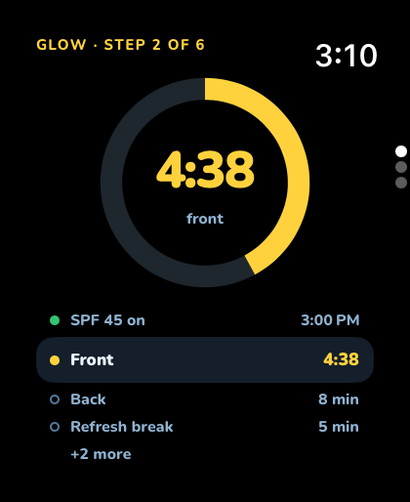
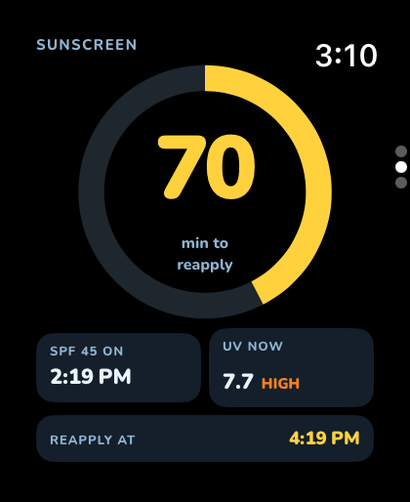
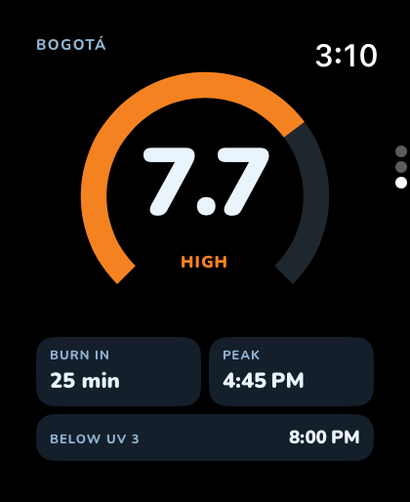
The Apple Watch app goes further than complications. It has three swipeable glances: Now (current UV, your burn-in time and today's peak), Sunscreen (minutes until your next reapply) and Glow (which step of a guided tan session you're on). Left to right, that's your whole sun day on a 40 mm screen:
How fresh is the widget number?
Honest answer: fresh enough to glance at, not to time a tan by. iOS refreshes third-party widgets on a system-managed budget — roughly every 20 minutes, with iOS alone deciding the exact moments — so a widget can briefly trail the sky. The number inside the app is the live one: UV Buddy interpolates Apple Weather's data minute by minute, down to one decimal. Use the widget for "do I need sunscreen for the school run?" and open the app for "how long can I actually stay out?"
No hands at all: ask Siri
UV Buddy also ships Siri shortcuts, so the fastest surface is your voice. "Hey Siri, get the UV index" or "best tan time" answers without touching the phone, and "check UV timer," "update UV timer" and "went inside" manage a running sunscreen timer from across the yard — wet hands, sandy hands, no hands.
UV at a glance, app closed
Sun Today puts today's UV curve, sunscreen hours and the tan window one swipe from whatever you're doing — in small, medium, large and Lock Screen sizes, for any family member. Glow Progress keeps your sun goal and your week in view right beside it.

Mini-FAQ
Why is my widget not updating?
Widgets refresh on iOS's schedule, not the app's — the system batches snapshot updates to protect battery, roughly every 20 minutes. If one seems genuinely stuck, remove it and re-add it, and check that Background App Refresh is on for UV Buddy in Settings. The in-app number is always live either way.
Does the widget drain battery?
No. A widget isn't the app running in the background — it's a static snapshot that iOS renders on its own schedule. That's the entire reason Apple budgets refreshes instead of letting widgets stream: a few tiny renders an hour cost almost nothing.
Can each family member have their own widget?
Yes. Every Sun Today widget is configurable per member — long-press it, tap Edit Widget and pick a person. Stack one per kid on the same page, or give each family member their own on their own phone.
Your UV index, zero taps away
Sun Today widgets, three Watch complications and a countdown in the Dynamic Island — set it up once, glance at it forever.
Download on theApp StoreFree to download · Family profiles · iPhone + Apple Watch